
Export Options
Choose Image, PDF, SVG, XLSX, or JSON for your next Pattern
Beadify gives every signed-in maker five export choices. Pick the format that matches what you want to do next: assemble the Pattern, share it, edit it in another tool, prepare materials, or keep a backup.
How to Export
- In the Editor, open the right Pattern panel and click Export.
- Choose Image Export, PDF Pack, SVG Pattern, XLSX Workbook, or JSON Backup.
- Review the preview and the availability message for the current Pattern.
- Adjust settings that belong to that format, then click Export.
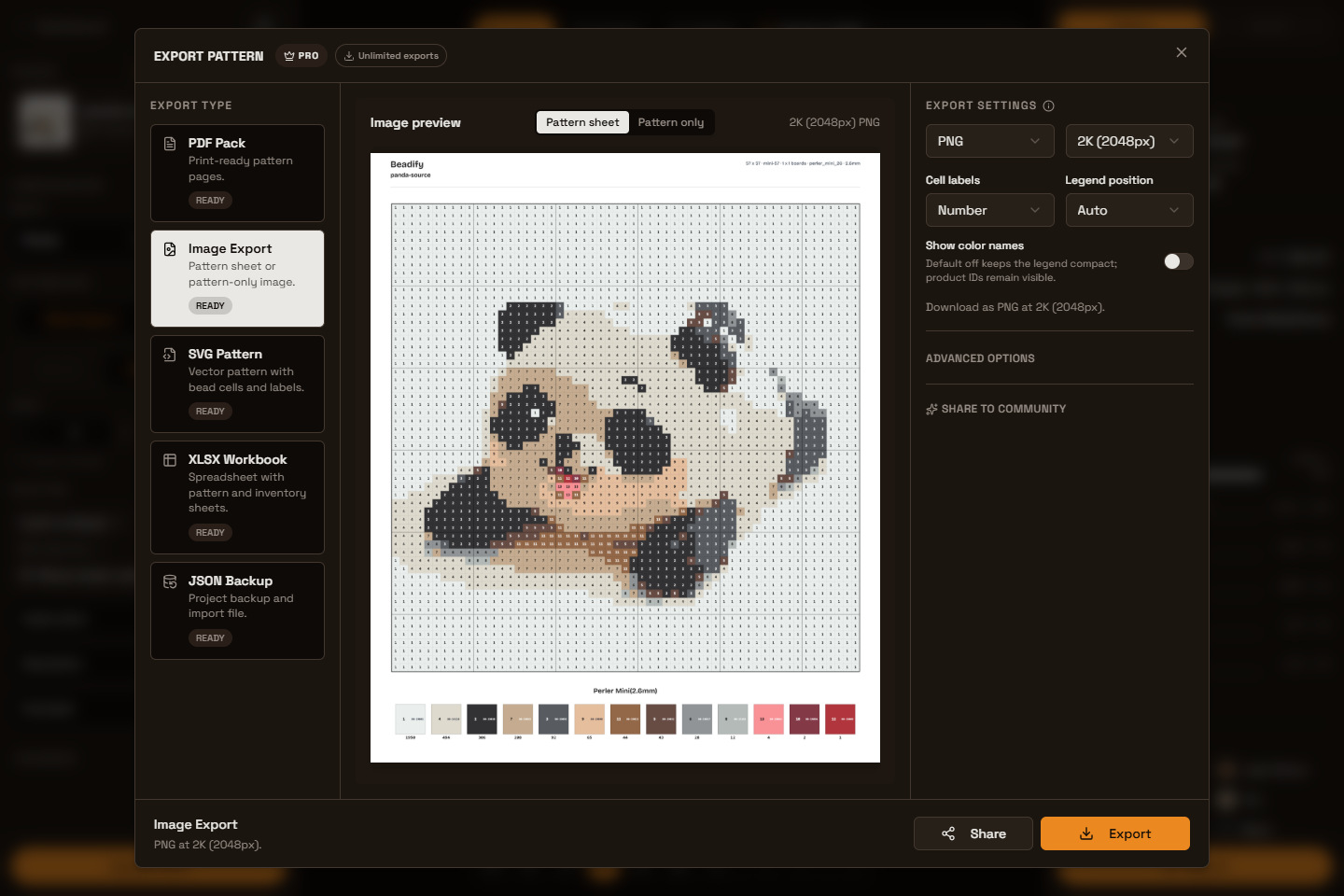
Choose a Format
- Image Export creates a PNG, JPEG, or WebP Pattern sheet or Pattern-only image for sharing and visual reference.
- PDF Pack opens the browser print flow with print-ready cover, color usage, and Pattern instruction pages. Exact-size Patterns are paginated for printing without being relabeled as physical boards. At 5mm, one instruction page holds up to 32 × 32 beads; at 2.6mm, it holds up to 64 × 64 beads. A larger Exact Pattern remains complete across multiple pages. Switch to Board layout before export when you need sections based on a fixed physical board template.
- SVG Pattern creates scalable vector artwork with cell labels, legend placement, and color metadata. Board guides appear only for Board layout; Exact size never invents them. SVG always remains vector.
- XLSX Workbook creates Pattern and Inventory sheets for material planning and spreadsheet workflows.
- JSON Backup saves the complete importable Pattern state for later use in Beadify.
Free and Paid Export Rules
Free uses one shared allowance of 3 exports per UTC day across Image, PDF, SVG, XLSX, and JSON. The allowance belongs to the signed-in account, rather than to one browser or one format.
Each Free export must contain exactly one physical board and no more than 16 used colors. If a Pattern has multiple boards or 17+ used colors, the modal explains the exact restriction and offers the paid path.
| Capability | Signed-in Free | Pro and Lifetime |
|---|---|---|
| Formats | Image, PDF, SVG, XLSX, and JSON | Image, PDF, SVG, XLSX, and JSON |
| Daily allowance | 3 shared exports per UTC day | Unlimited exports |
| Pattern size | Exactly 1 physical board, up to 16 used colors | Multi-board Patterns and 17+ used colors |
| Image resolution | Standard 1280px | Selectable 2K or 4K when supported |
| Beadify branding | Required in the form supported by each format | Can be hidden on supported formats |
Image Resolution
Resolution applies only to raster Image Export:
- Standard (1280px) is the fixed Free Image resolution.
- 2K (2048px) and 4K (4096px) are paid choices when the device and Pattern can prepare them safely.
PDF, XLSX, and JSON use their own document or data structures. SVG is a vector file, so raster Image resolution does not apply to it.
Branding
Free files keep format-appropriate Beadify branding. Depending on the format, that may appear in the visible document, file metadata, or another supported brand field. Pro and Lifetime users can hide Beadify branding on supported formats for their own shop, classroom, or creator brand.
PDF Print Counting
PDF uses the browser print window rather than a normal file download. Beadify counts one export immediately before opening that window. If you cancel the print window, the export still counts because the print intent has already started.
The app records PDF print intent only. It does not report a confirmed download, because the browser does not tell Beadify whether you ultimately saved or printed the document.
Preview and Settings
- Image and SVG previews use the current visual output whenever possible.
- PDF previews show the document structure before the browser print flow.
- XLSX previews show the Pattern and Inventory sheet structure.
- JSON previews show the backup shape while the exported file keeps the full Pattern data.
- Image-only controls include PNG/JPEG/WebP, Pattern sheet vs Pattern only, and Standard/2K/4K resolution.
- Visual sheet controls such as cell labels and legend placement appear only where the selected format supports them.
If you changed the source image in Compare or the right Details tab, click Update Pattern before exporting. Export always uses the applied Pattern, not an unapplied draft preview.
Share From Export
When Image Export is selected, you can prepare a branded sharing image, copy the image or Beadify link, or open a supported sharing destination. This does not publish to Showcase; Showcase submission remains a separate flow.
Coloring Page Export Is Separate
Photo to Coloring Page has its own lightweight export flow outside the Editor. Download the adjusted coloring page directly as a PNG, or select A4 or US Letter and use Print / Save as PDF in your browser. These coloring-page actions do not use the Pattern export allowance.